共计 6160 个字符,预计需要花费 16 分钟才能阅读完成。
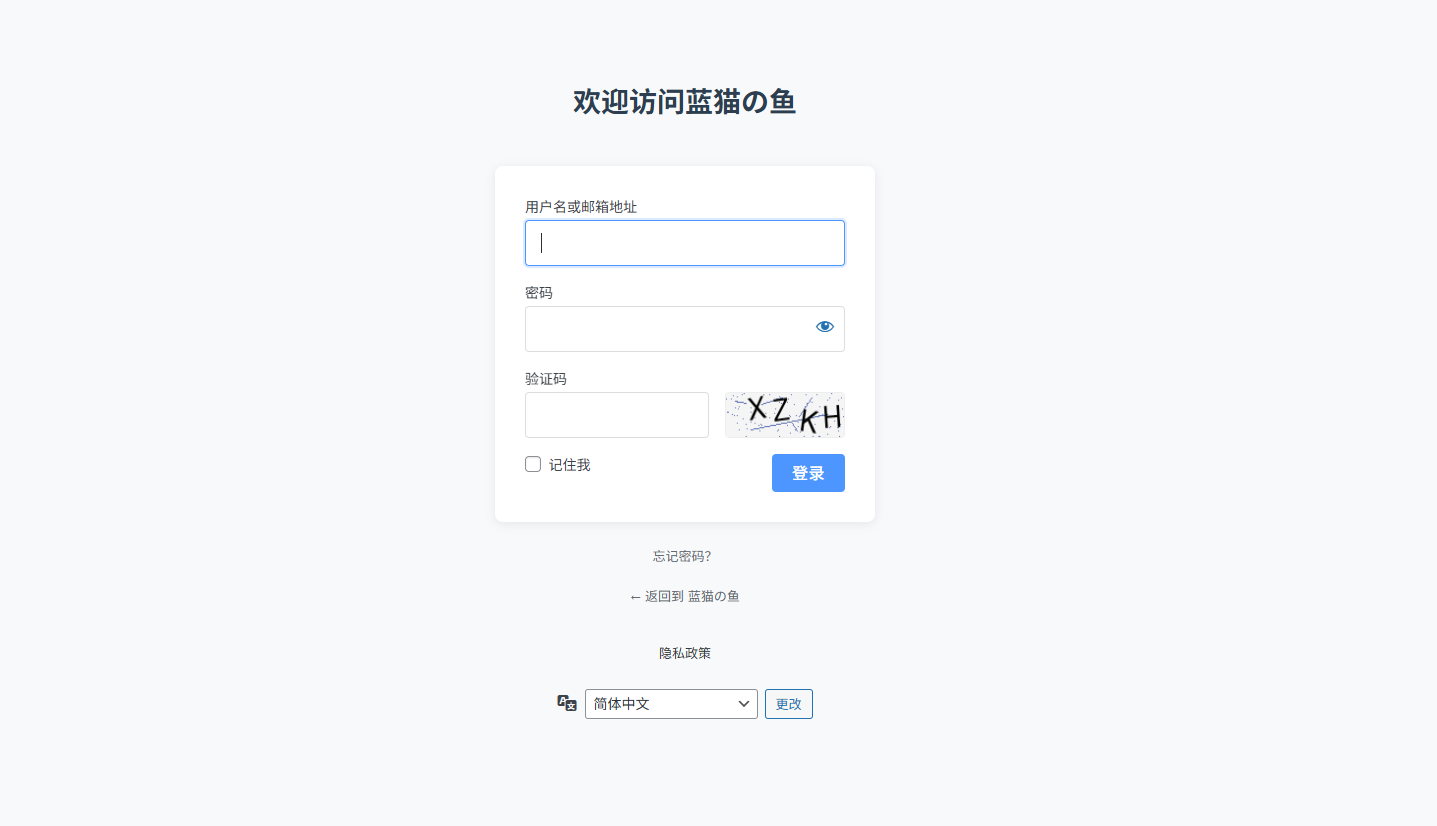
效果图如上,感兴趣的小伙伴可以自己美化一下
1. functions.php 加入以下代码
</p>
<div>/**</div>
<div> * 生成图片验证码 </div>
<div> */</div>
<div>function generate_image_captcha() {</div>
<div>// 启动 session(如果尚未启动)</div>
<div>if (!session_id()) {</div>
<div>session_start();</div>
<div>}</div>
<div> </div>
<div>// 验证码配置 </div>
<div>$width = 120;</div>
<div>$height = 40;</div>
<div>$font_size = 20;</div>
<div>$chars = ‘23456789ABCDEFGHJKLMNPQRSTUVWXYZ’; // 去掉了容易混淆的字符 </div>
<div>$captcha_length = 4;</div>
<div> </div>
<div>// 生成随机验证码 </div>
<div>$captcha = ”;</div>
<div>for ($i = 0; $i < $captcha_length; $i++) {</div>
<div>$captcha .= $chars[rand(0, strlen($chars) – 1)];</div>
<div>}</div>
<div> </div>
<div>// 存储验证码到 session</div>
<div>$_SESSION[‘login_captcha’] = strtolower($captcha);</div>
<div> </div>
<div>// 创建图片 </div>
<div>$image = imagecreatetruecolor($width, $height);</div>
<div> </div>
<div>// 颜色定义 </div>
<div>$bg_color = imagecolorallocate($image, 245, 245, 245); // 背景色 </div>
<div>$text_color = imagecolorallocate($image, 0, 0, 0); // 黑色文字 </div>
<div>$noise_color = imagecolorallocate($image, 100, 120, 180); // 干扰线颜色 </div>
<div> </div>
<div>// 填充背景 </div>
<div>imagefilledrectangle($image, 0, 0, $width, $height, $bg_color);</div>
<div> </div>
<div>// 添加干扰线(5 条随机线)</div>
<div>for ($i = 0; $i < 5; $i++) {</div>
<div>imageline($image, </div>
<div>rand(0, $width), rand(0, $height),</div>
<div>rand(0, $width), rand(0, $height),</div>
<div>$noise_color);</div>
<div>}</div>
<div> </div>
<div>// 添加噪点(100 个随机像素点)</div>
<div>for ($i = 0; $i < 100; $i++) {</div>
<div>imagesetpixel($image, </div>
<div>rand(0, $width), rand(0, $height),</div>
<div>$noise_color);</div>
<div>}</div>
<div> </div>
<div>// 计算文本位置(居中)</div>
<div>// 修正字体路径,使用主题目录函数 </div>
<div>$font_path = get_template_directory() . ‘/diy/fonts/Arial.ttf’;</div>
<div>$textbox = imagettfbbox($font_size, 0, $font_path, $captcha);</div>
<div>$x = ($width – $textbox[4]) / 2;</div>
<div>$y = ($height – $textbox[5]) / 2;</div>
<div> </div>
<div>// 添加文字(每个字符不同位置和角度)</div>
<div>for ($i = 0; $i < $captcha_length; $i++) {</div>
<div>$angle = rand(-10, 10);</div>
<div>$char_x = $x + ($i * ($font_size + 5));</div>
<div>$char_y = $y + rand(-5, 5);</div>
<div> </div>
<div>imagettftext($image, $font_size, $angle, </div>
<div>$char_x, $char_y, </div>
<div>$text_color, $font_path, </div>
<div>$captcha[$i]);</div>
<div>}</div>
<div> </div>
<div>// 输出图片 </div>
<div>header(‘Content-Type: image/png’);</div>
<div>imagepng($image);</div>
<div>imagedestroy($image);</div>
<div>exit;</div>
<div>}</div>
<div> </div>
<div>/**</div>
<div> * 添加验证码字段(美化版)</div>
<div> */</div>
<div>function add_beautiful_captcha_to_login() {</div>
<div>$captcha_url = site_url(‘?generate_captcha=1&t=’.time());</div>
<div> </div>
<div>echo ‘<div class=”captcha-container”></div>
<div><label for=”image_captcha”> 验证码 </label></div>
<div><div class=”captcha-row”></div>
<div><input type=”text” name=”image_captcha” id=”image_captcha” </div>
<div> class=”input” value=”” size=”20″ required </div>
<div> autocomplete=”off” autocapitalize=”off”></div>
<div><img src=”‘.$captcha_url.'” alt=”CAPTCHA” class=”captcha-image” </div>
<div>onclick=”this.src=\”.site_url(‘?generate_captcha=1&t=’).’\’ + Date.now()”></div>
<div></div></div>
<div> </div>’;</div>
<div>}</div>
<div>add_action(‘login_form’, ‘add_beautiful_captcha_to_login’);</div>
<div> </div>
<div>/**</div>
<div> * 验证验证码(修正版)</div>
<div> */</div>
<div>function verify_image_captcha($user, $password) {</div>
<div>// 确保 session 已启动 </div>
<div>if (!session_id()) {</div>
<div>session_start();</div>
<div>}</div>
<div> </div>
<div>// 优先验证验证码(如果验证码错误,直接返回,不继续验证账号密码)</div>
<div>$user_input = isset($_POST[‘image_captcha’]) ? strtolower(trim($_POST[‘image_captcha’])) : ”;</div>
<div>$correct_captcha = isset($_SESSION[‘login_captcha’]) ? $_SESSION[‘login_captcha’] : ”;</div>
<div> </div>
<div>// 清除已使用的验证码(无论对错)</div>
<div>unset($_SESSION[‘login_captcha’]);</div>
<div> </div>
<div>// 验证码为空时的错误 </div>
<div>if (empty($user_input)) {</div>
<div>return new WP_Error(‘captcha_empty’, __(‘<strong> 错误 </strong>: 请输入验证码 ’));</div>
<div>}</div>
<div> </div>
<div>// 验证码不匹配时的错误 </div>
<div>if ($user_input !== $correct_captcha) {</div>
<div>return new WP_Error(‘captcha_failed’, __(‘<strong> 错误 </strong>: 验证码不正确 ’));</div>
<div>}</div>
<div> </div>
<div>// 如果验证码正确,继续原有的账号密码验证 </div>
<div>return $user;</div>
<div>}</div>
<div>add_filter(‘wp_authenticate_user’, ‘verify_image_captcha’, 10, 2);</div>
<div> </div>
<div>/**</div>
<div> * 处理验证码图片生成请求 </div>
<div> */</div>
<div>function handle_captcha_generation() {</div>
<div>if (isset($_GET[‘generate_captcha’])) {</div>
<div>generate_image_captcha();</div>
<div>}</div>
<div>}</div>
<div>add_action(‘init’, ‘handle_captcha_generation’);</div>
<div> </div>
<div>/**</div>
<div> * 初始化 session</div>
<div> */</div>
<div>function start_captcha_session() {</div>
<div>if (!session_id() && !headers_sent()) {</div>
<div>session_start();</div>
<div>}</div>
<div>}</div>
<div>add_action(‘init’, ‘start_captcha_session’, 1);</div>
<div> </div>
<div> </div>
<div>/**</div>
<div> * WordPress 登录页面加载自定义样式(主题环境适配)</div>
<div> */</div>
<div>function custom_login_page_styles() {</div>
<div> // 对于主题中的文件,使用主题专用函数获取路径 </div>
<div> $css_url = get_template_directory_uri() . ‘/diy/login-style.css’;</div>
<div> $css_path = get_template_directory() . ‘/diy/login-style.css’;</div>
<div> </div>
<div> // 检查文件是否存在 </div>
<div> if (file_exists($css_path)) {</div>
<div> wp_enqueue_style(</div>
<div> ‘custom-login-style’,</div>
<div> $css_url,</div>
<div> array(),</div>
<div> ‘1.0’</div>
<div> );</div>
<div> } else {</div>
<div> error_log(‘ 自定义登录样式 CSS 文件未找到: ‘ . $css_path);</div>
<div> }</div>
<div>}</div>
<div>add_action(‘login_enqueue_scripts’, ‘custom_login_page_styles’);</div>
<div> </div>
<div> </div>
<div> </div>
<div>// 修改登录 Logo 链接地址 </div>
<div>function custom_login_url() {</div>
<div> return home_url(); // 链接到网站首页 </div>
<div>}</div>
<div>add_filter(‘login_headerurl’, ‘custom_login_url’);</div>
<div> </div>
<div>// 修改 Logo 的 title 提示文字 </div>
<div>function custom_login_title() {</div>
<div> return ‘ 欢迎访问 ’ . get_bloginfo(‘name’); // 组合博客名称作为提示 </div>
<div>}</div>
<div>add_filter(‘login_headertext’, ‘custom_login_title’);</div>
<div> </div>
<div>// 将登录 Logo 从图标改为文字并添加样式 </div>
<div>function custom_login_style() {</div>
<div> echo ‘<style type=”text/css”></div>
<div> /* 隐藏默认的 Logo 图像 */</div>
<div> .login h1 a {</div>
<div> background-image: none !important;</div>
<div> text-indent: 0 !important;</div>
<div> width: auto !important;</div>
<div> height: auto !important;</div>
<div> font-size: 28px !important;</div>
<div> color: #2c3e50 !important;</div>
<div> line-height: 1.5 !important;</div>
<div> padding: 20px 0 !important;</div>
<div> font-weight: bold !important;</div>
<div> text-decoration: none !important;</div>
<div> }</div>
<div> /* 可选:添加悬停效果 */</div>
<div> .login h1 a:hover {</div>
<div> color: #3498db !important;</div>
<div> }</div>
<div> </style>’;</div>
<div>}</div>
<div>add_action(‘login_head’, ‘custom_login_style’);</div>
<p>
2. 下载字体文件
确保下载的字体文件 arial.ttf 已上传到 主题根目录下 /diy/fonts 文件夹中,这里也可以自己指定。
3. 写入 css
复制下面的代码 到 主题根目录下 /diy/ 文件夹里面新建文件,login-style.css
</p>
<p>/* 整体页面样式 */<br />
body.login {<br />
background-color: #f8f9fa;<br />
font-family: -apple-system, BlinkMacSystemFont, “Segoe UI”, Roboto, Oxygen-Sans, Ubuntu, Cantarell, “Helvetica Neue”, sans-serif;<br />
}</p>
<p>/* 登录框样式 */<br />
#login {<br />
width: 380px;<br />
padding: 5% 0 0;<br />
margin: 0 auto;<br />
}</p>
<p>.login h1 a {<br />
background-size: contain;<br />
width: 100%;<br />
height: 80px;<br />
margin-bottom: 20px;<br />
}</p>
<p>/* 表单样式 */<br />
.login form {<br />
border-radius: 8px;<br />
box-shadow: 0 2px 10px rgba(0,0,0,0.08);<br />
border: none;<br />
padding: 30px;<br />
background: #fff;<br />
}</p>
<p>/* 输入框样式 */<br />
.login input[type=”text”],<br />
.login input[type=”password”] {<br />
border: 1px solid #ddd;<br />
border-radius: 4px;<br />
padding: 12px 15px;<br />
font-size: 15px;<br />
height: auto;<br />
box-shadow: none;<br />
transition: all 0.3s;<br />
}</p>
<p>.login input[type=”text”]:focus,<br />
.login input[type=”password”]:focus {<br />
border-color: #4d96ff;<br />
box-shadow: 0 0 0 2px rgba(77, 150, 255, 0.2);<br />
}</p>
<p>/* 按钮样式 */<br />
.wp-core-ui .button-primary {<br />
background: #4d96ff;<br />
border: none;<br />
box-shadow: none;<br />
text-shadow: none;<br />
border-radius: 4px;<br />
padding: 1px 20px !important;<br />
height: auto;<br />
font-weight: 500;<br />
text-transform: uppercase;<br />
letter-spacing: 0.5px;<br />
font-size: 16px;<br />
transition: all 0.3s;<br />
}</p>
<p>.wp-core-ui .button-primary:hover {<br />
background: #3a7de0;<br />
}</p>
<p>/* 验证码区域样式 */ <br />
.captcha-row {<br />
display: flex;<br />
gap: 10px;<br />
}</p>
<p>#image_captcha {<br />
flex: 1;<br />
padding: 12px 15px;<br />
border: 1px solid #ddd;<br />
border-radius: 4px;<br />
font-size: 15px;<br />
height: auto;<br />
}</p>
<p>.captcha-image {<br />
width: 120px;<br />
height: 46px;<br />
border: 1px solid #eee;<br />
border-radius: 4px;<br />
background: #f5f7fa;<br />
cursor: pointer;<br />
transition: all 0.3s;<br />
}</p>
<p>.captcha-image:hover {<br />
opacity: 0.9;<br />
}</p>
<p>.captcha-description {<br />
margin: 8px 0 0;<br />
color: #646970;<br />
font-size: 13px;<br />
}</p>
<p>/* 页脚链接样式 */<br />
.login #nav,<br />
.login #backtoblog {<br />
text-align: center;<br />
padding: 0;<br />
margin: 20px 0 0;<br />
}</p>
<p>.login #nav a,<br />
.login #backtoblog a {<br />
color: #646970;<br />
transition: color 0.3s;<br />
}</p>
<p>.login #nav a:hover,<br />
.login #backtoblog a:hover {<br />
color: #4d96ff;<br />
}</p>
<p>/* 响应式调整 */<br />
@media screen and (max-width: 480px) {<br />
#login {<br />
padding: 20% 0 0;<br />
}<br />
}</p>
<p>
到此美化教程结束!
正文完


